
Compliance Manager · included with every team plan
Every card. Every store.
One screen.
The training system of record for multi-location food service: who's certified, who's mid-course, what expires next month — by store, in real time. Your GMs see their own crew; you see everything. Nobody keeps a spreadsheet.
Built around the questions you actually ask
Not a learning platform with forty menus — a compliance tool with four jobs.
"Who's not certified yet?"
The dashboard answers at a glance, by store: certified, in progress, invited-but-not-started, expiring. Store managers see exactly their own crew — the hierarchy is real, so the Airport GM never wades through Riverside's roster — while ops sees the roll-up across every location.
"Someone new starts Monday."
Give them the team code — or let your onboarding checklist do it. They claim a seat, pick their store and their state from the lists you approved, and sign in with a magic link on their own phone. No passwords, no company email, no one sitting beside them. If they already hold a valid card, it attaches instead of burning a seat.
"What's about to lapse?"
Cards expire on a schedule your county sets; surprises are optional. Expirations surface weeks ahead, on the dashboard and in the reports — so renewals start while the current card is still valid, and the wall calendar with highlighter marks retires.
"The inspector is here."
Every certificate carries a number anyone can verify on our public lookup — no login, no phone call to us. Pull the store's status from the dashboard on the spot, or hand over the report. The card itself belongs to the worker, portable to their next job; the audit trail stays with you.
The compliance tools, up close
Real screens, not mockups — this is the Bluebird demo company inside the actual product.
One dashboard, every store
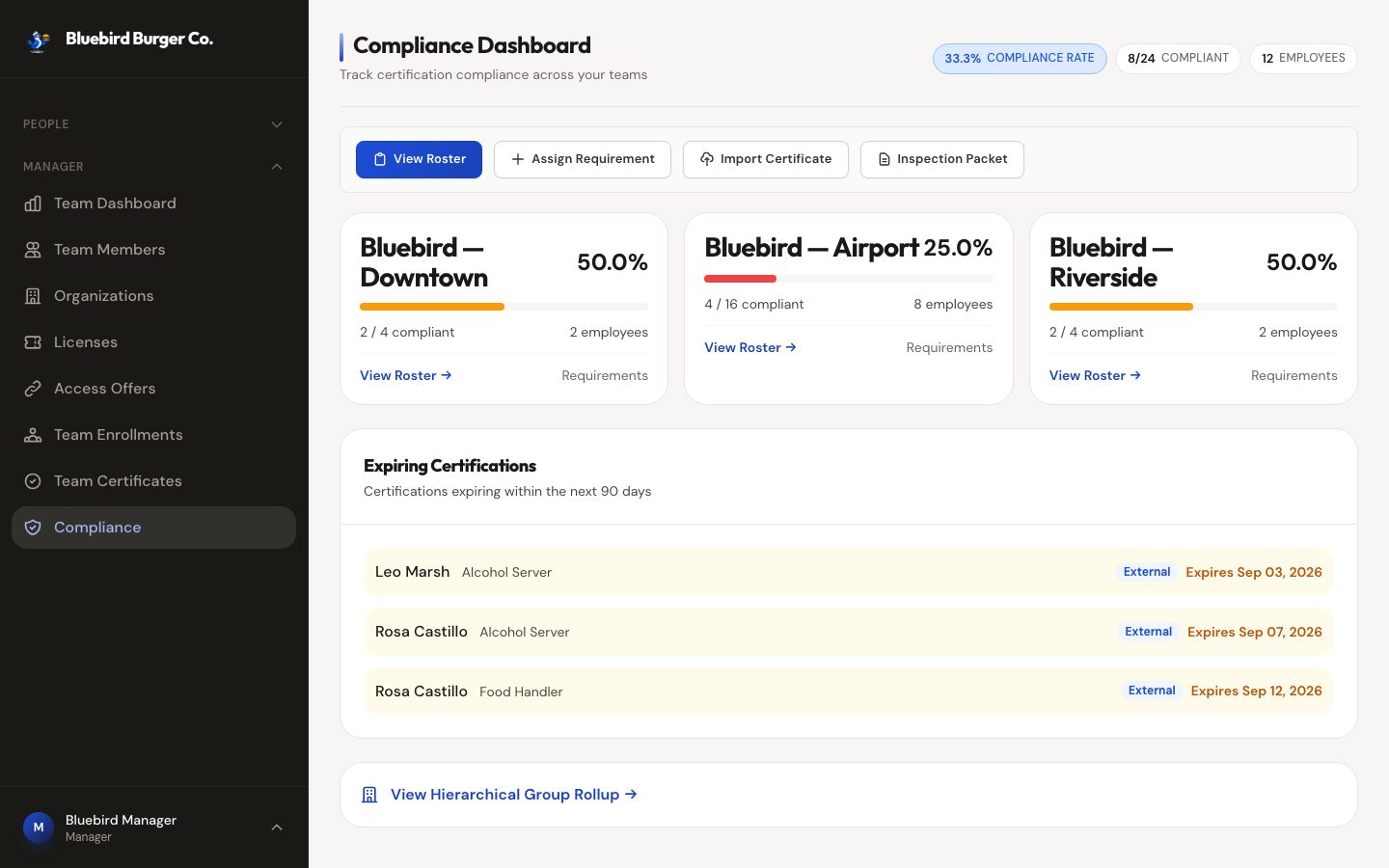
Each location gets a compliance card — percent compliant, headcount, straight into its roster — with expiring certifications for the next 90 days surfaced underneath, tagged by whether we issued them or you imported them. The action bar covers the four things you actually do: view a roster, assign a requirement, import a certificate, build an inspection packet.
The roster is a grid, not a list
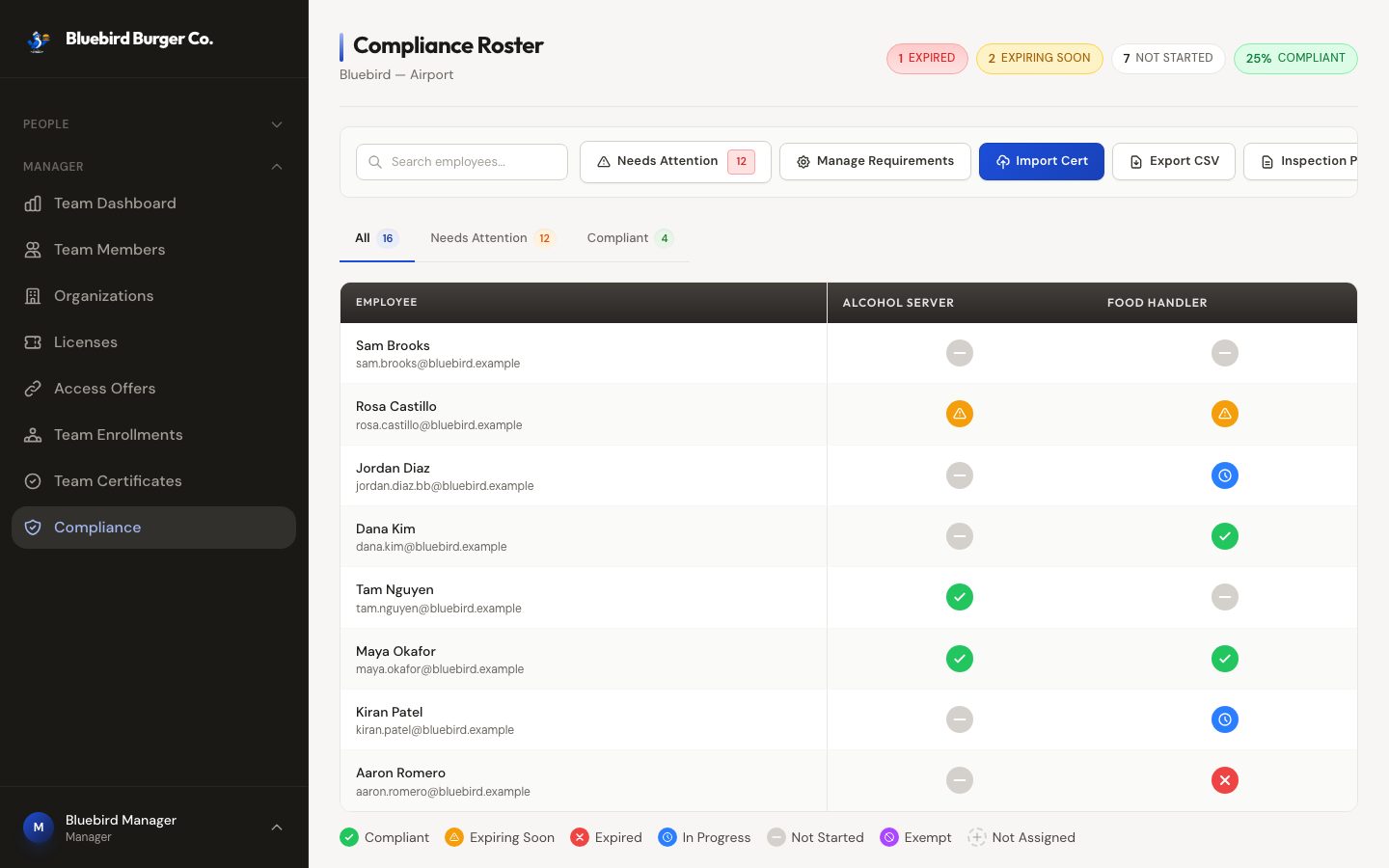
Employees down the side, requirements across the top, one status icon per cell — compliant, expiring soon, expired, in progress, not started, or exempt. Click a cell to remind, exempt, or open the certificate behind it. The "Needs attention" tab strips it down to exactly who's expired, expiring, or hasn't started, worst first.
Cards from past jobs count
New hire already holds a valid card from somewhere else? Import it — issuer, dates, certificate number — then mark it verified or rejected. It slots into the same roster with the same expiry tracking, and nobody retakes training they don't need.
The inspection packet
One click builds a PDF for the health inspector: compliance summary, every employee's requirement status, certificate images attached. Big roster? It generates in the background and lands in your inbox.
The 7 a.m. email
Every morning, the system checks the next 90 days. Managers get a summary of expiring certifications; affected employees get their own notice. The wall calendar is officially retired.
Running the team is the easy part
Seats you can see
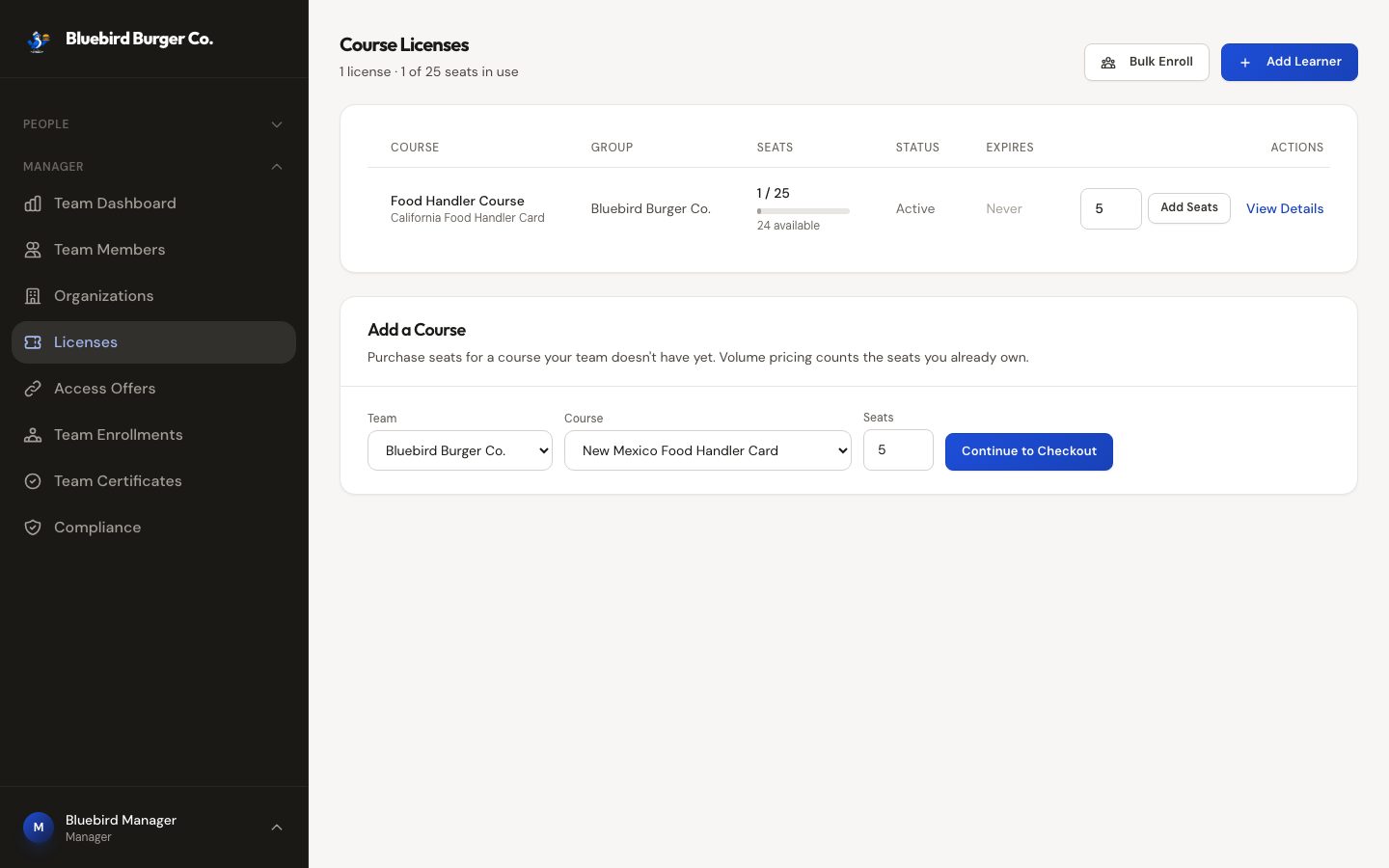
Every license shows its utilization at a glance — seats used, seats available, what's expiring. Running low? Add seats inline; the checkout already knows your volume tier, and it counts the seats you own, so growing never resets your pricing. Adding a whole new course to the team starts from the same screen.
Enroll a whole crew in one paste
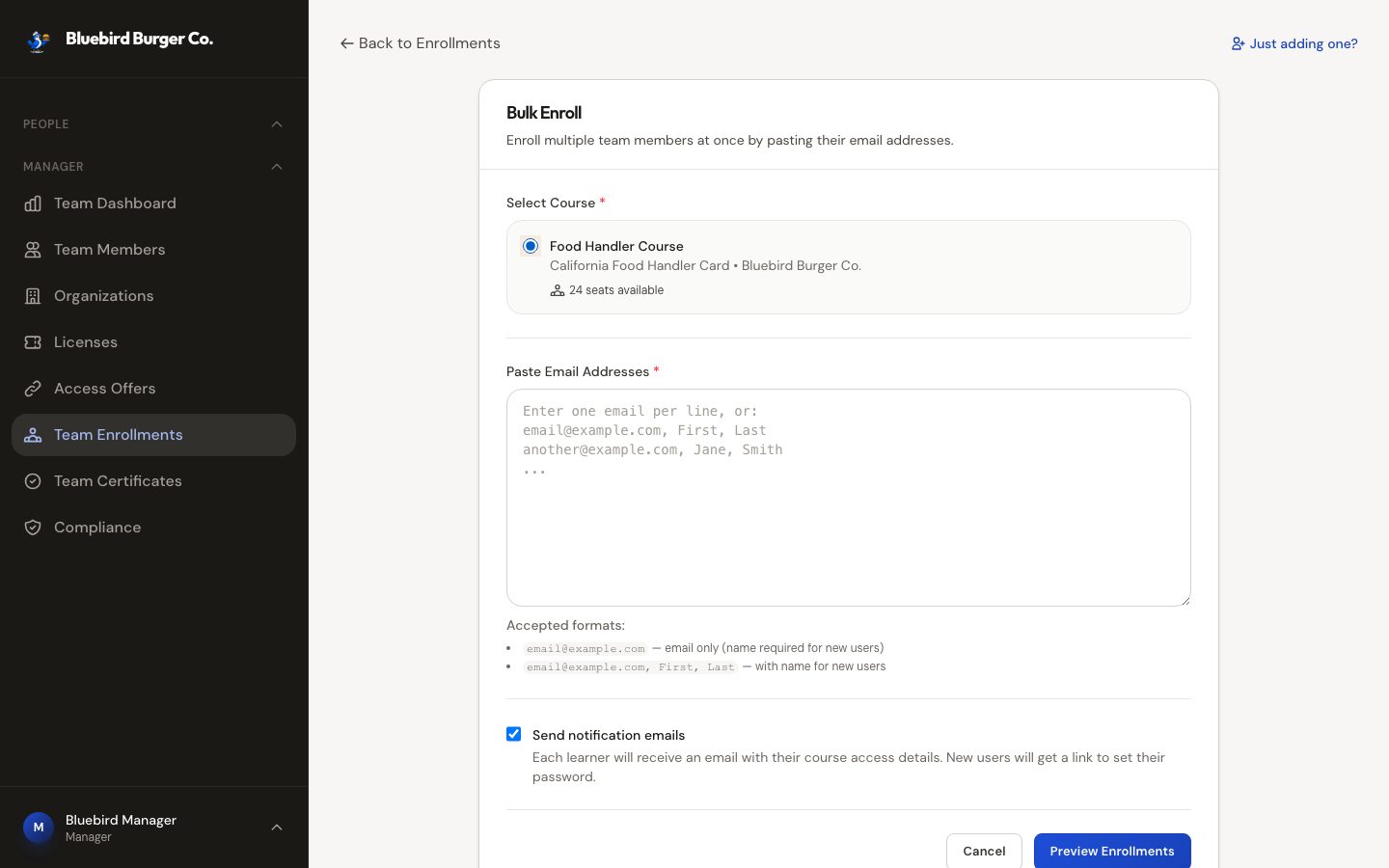
Paste emails — with names or without — and get a preview first: who's ready, who's already enrolled, what's a typo, and how many seats it'll use. Then one click. Invitations go out with magic links; you can resend an invite or nudge a straggler from their row, and withdrawing someone returns the seat.
Proof that answers for itself
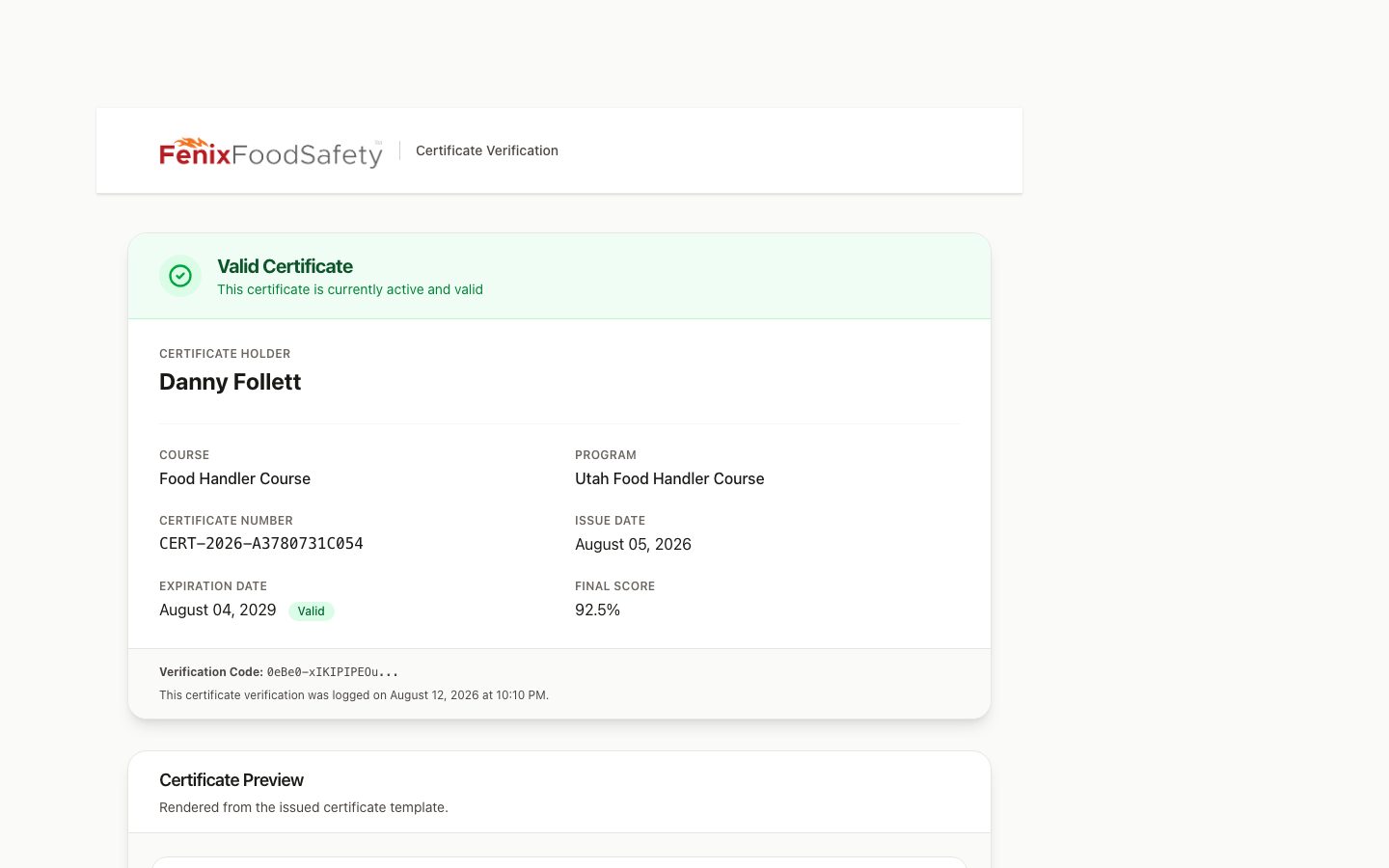
Every certificate has a public verification page — scan the QR on the card or type the number, no account needed. Inspectors see holder, course, dates, and validity in seconds, and every lookup is logged, so you can even see that the health department checked. Your certificate list is searchable and exports to CSV whenever someone upstream asks for "the spreadsheet."
Also in the manager portal: enrollment, completion, engagement, and compliance reports with date-range and per-course filters — every one exportable to CSV — plus per-store rosters, member profiles with full training history, and renewal cycles that keep past completions on the record when a new cycle starts. And if you'd like the course itself to open with your own welcome video — or carry lessons of your own — content can be tailored per group. Worth asking about.
Seats, simply
Buy once, at your rate
Purchase a block of seats at volume pricing. One claim code covers your whole team — no per-person paperwork, no purchase order per hire.
Seats aren't wasted
A seat is consumed when a worker actually claims it — not when someone is merely added to a list. New hires with a valid card attach without spending one, and you can top up mid-cycle in two clicks when hiring runs hot.
Or let staff pay their way
Prefer not to prepay? A branded portal at your negotiated rate lets employees cover their own card — same dashboard, same tracking, different wallet. Mix both across stores if that's how you operate.
Three ways your crew gets in
Compliance Manager is the destination; pick whichever doors fit how you run. They combine freely.
A team code
The zero-setup door: one code, shared however you share things. Workers claim a seat and go. Working the day you sign up.
A branded portal
Your name, your colors, your subdomain — training that looks like yours because it is. The professional front door for onboarding packets and QR codes by the time clock.
Your HR system
Connect your roster and hiring becomes the trigger: invites go out automatically, departures tidy up, records flow back keyed to your employee IDs. How the connection works →
Running your own LMS? Then you may not need this dashboard at all — our courses can run inside your system, with results in your gradebook. See course dispatch →
ANAB-accredited courses. The training your health department expects, with jurisdiction handled per worker — each picks their state from the list you approve, so nobody ends up with a card their county won't take.
Publicly verifiable certificates. Every card has a number any inspector can check on our lookup page in seconds — no account, no waiting on us.
Records that outlast turnover. The card belongs to the worker and follows them; your reporting stays intact when they move on. Rehires pick up their history where it left off.
See it with your stores in it
Tell us how many locations and roughly how many people — we'll set up a walkthrough that looks like your operation, not a generic demo.